
Create a business process flow to help your users
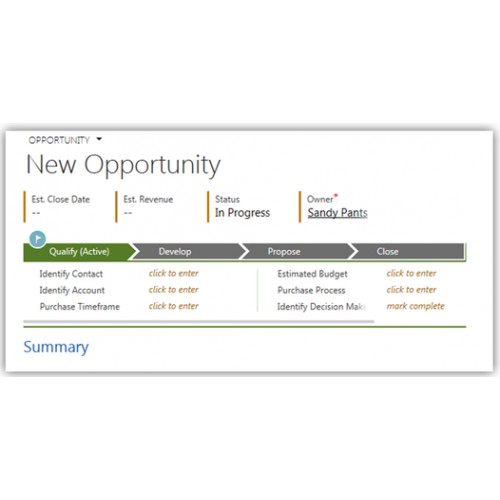
A Business Process Flow in Microsoft Dynamics 365 is a tool which is meant to help guide users through a business process in the system. Business process flows are representations of your business processes and are displayed visually in Dynamics 365 as a heading across the top of an entity form. Business process flows enable you to require users to complete certain steps before completing the process and if needed you can also allow users to jump stages. They are highly configurable to fit your organizational needs.
What we can do:
- Create a custom business process flow for your business
- Edit a current business process flow you have in place
| Supported Systems | |
| CRM Systems | Microsoft Dynamics CRM Online, Microsoft Dynamics CRM 2016, Microsoft Dynamics 365, Microsoft Dynamics 365 Online |
Warning: A non-numeric value encountered in /var/www/store/public_html/appfinder/catalog/view/theme/megashop/template/product/product_related.tpl on line 8


Related Products
$160.00
$260.00
$250.00
$1,500.00
Price
- $150.00
Turnaround
1 Day
Revisions
2
Reviews: 0
Views: 3785
- Flowchart
- CRM administrator access (The job can also be completed via a screen-share if preferred, but this may delay the delivery)
- Completed brief outlining what you want us to provide you with
- We will contact you once we have received these to clarify our thoughts are aligned.
Microsoft Dynamics 365, Microsoft Dynamics CRM 2016, Microsoft Dynamics CRM Online, Microsoft Dynamics 365 Online

Date Added
05/04/2017
Last Updated
01/05/2017